Syncfusion.Blazor.RichTextEditor 33.1.45
Syncfusion® Blazor Rich Text Editor
Feature-rich WYSIWYG HTML and Markdown editor for creating and formatting rich content in Blazor applications.
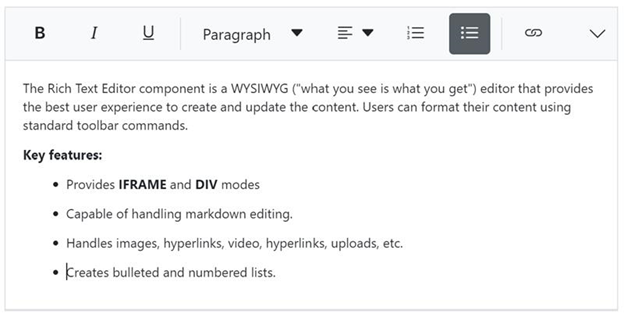
Overview
The Blazor Rich Text Editor is a powerful WYSIWYG editor for creating blogs, forum posts, notes, comments, messaging applications, and support tickets. It provides comprehensive formatting tools, supports both HTML and Markdown modes, and returns valid markup for seamless content integration.
Key Features
- Dual editing modes - HTML and Markdown (MD) editing with mode switching
- Rich formatting tools - Text formatting, fonts, colors, alignment, and styles
- Insert capabilities - Images, links, tables, lists, code blocks, and media
- Toolbar customization - Configurable toolbar with custom tools and commands
- Table support - Create and edit tables with cell merging and formatting
- Image management - Upload, resize, and position images with drag-and-drop
- Link insertion - Insert hyperlinks and email links with validation
- Paste cleanup - Smart paste from Word and other sources with formatting cleanup
- Undo/Redo - Full undo and redo support with history management
- Full-screen mode - Distraction-free editing experience
- Character and word count - Track content length in real-time
- Import/Export - Import Word documents and export content
- Responsive design - Touch-friendly interface for mobile devices
- Inline and iframe modes - Flexible rendering options
- Custom formatting - Apply custom CSS classes and inline styles
- Accessibility - WCAG 2.2 compliant with keyboard shortcuts and screen reader support
- RTL support - Right-to-left language compatibility
- Themes - Multiple built-in themes and custom styling
Supported Platforms
- Blazor Server (.NET 8.0 and later)
- Blazor WebAssembly (.NET 8.0 and later)
- Blazor Hybrid (.NET 8.0 and later)
See System Requirements for detailed compatibility information.
Installation
.NET CLI
dotnet add package Syncfusion.Blazor.RichTextEditor
Package Manager
Install-Package Syncfusion.Blazor.RichTextEditor
Getting Started
1. Register Syncfusion® Blazor Service
Add the Syncfusion® Blazor service in your Program.cs:
using Syncfusion.Blazor;

builder.Services.AddSyncfusionBlazor();
2. Add Stylesheet and Script References
For Blazor Web App or Blazor Server, add the references in Components/App.razor or App.razor:
For Blazor WebAssembly, add the references in wwwroot/index.html:
<head>
    <link href="_content/Syncfusion.Blazor.Themes/bootstrap5.css" rel="stylesheet" />
    <script src="_content/Syncfusion.Blazor.Core/scripts/syncfusion-blazor.min.js" type="text/javascript"></script>
</head>
3. Add Rich Text Editor Component
Create a rich text editor:
@using Syncfusion.Blazor.RichTextEditor
<SfRichTextEditor Placeholder="Start Typing...">
    <RichTextEditorToolbarSettings Items="@tools" />
</SfRichTextEditor>
@code {
    private List<ToolbarItemModel> tools = new List<ToolbarItemModel>()
    {
        new ToolbarItemModel() { Command = ToolbarCommand.Bold },
        new ToolbarItemModel() { Command = ToolbarCommand.Italic },
        new ToolbarItemModel() { Command = ToolbarCommand.Underline },
        new ToolbarItemModel() { Command = ToolbarCommand.Separator },
        new ToolbarItemModel() { Command = ToolbarCommand.Formats },
        new ToolbarItemModel() { Command = ToolbarCommand.Alignments },
        new ToolbarItemModel() { Command = ToolbarCommand.OrderedList },
        new ToolbarItemModel() { Command = ToolbarCommand.UnorderedList },
        new ToolbarItemModel() { Command = ToolbarCommand.Separator },
        new ToolbarItemModel() { Command = ToolbarCommand.CreateLink },
        new ToolbarItemModel() { Command = ToolbarCommand.Image },
        new ToolbarItemModel() { Command = ToolbarCommand.Separator },
        new ToolbarItemModel() { Command = ToolbarCommand.Undo },
        new ToolbarItemModel() { Command = ToolbarCommand.Redo }
    };
}
4. Custom Toolbar Configuration
Configure toolbar with specific tools:
@using Syncfusion.Blazor.RichTextEditor

<SfRichTextEditor @bind-Value="@content">
    <RichTextEditorToolbarSettings Items="@tools" />
</SfRichTextEditor>

@code {
    private string content = "<p>Start typing...</p>";

    private List<ToolbarItemModel> tools = new List<ToolbarItemModel>()
    {
        new ToolbarItemModel() { Command = ToolbarCommand.Bold },
        new ToolbarItemModel() { Command = ToolbarCommand.Italic },
        new ToolbarItemModel() { Command = ToolbarCommand.Underline },
        new ToolbarItemModel() { Command = ToolbarCommand.Separator },
        new ToolbarItemModel() { Command = ToolbarCommand.Formats },
        new ToolbarItemModel() { Command = ToolbarCommand.Alignments },
        new ToolbarItemModel() { Command = ToolbarCommand.OrderedList },
        new ToolbarItemModel() { Command = ToolbarCommand.UnorderedList },
        new ToolbarItemModel() { Command = ToolbarCommand.Separator },
        new ToolbarItemModel() { Command = ToolbarCommand.CreateLink },
        new ToolbarItemModel() { Command = ToolbarCommand.Image },
        new ToolbarItemModel() { Command = ToolbarCommand.Separator },
        new ToolbarItemModel() { Command = ToolbarCommand.Undo },
        new ToolbarItemModel() { Command = ToolbarCommand.Redo }
    };
}
5. Markdown Mode
Enable Markdown editing:
@using Syncfusion.Blazor.RichTextEditor

<SfRichTextEditor EditorMode="EditorMode.Markdown" @bind-Value="@markdownContent">
    <RichTextEditorToolbarSettings Items="@markdownTools" />
</SfRichTextEditor>

@code {
    private string markdownContent = "# Hello Markdown\n\nThis is **bold** and this is *italic*.";

    private List<ToolbarItemModel> markdownTools = new List<ToolbarItemModel>()
    {
        new ToolbarItemModel() { Command = ToolbarCommand.Bold },
        new ToolbarItemModel() { Command = ToolbarCommand.Italic },
        new ToolbarItemModel() { Command = ToolbarCommand.StrikeThrough },
        new ToolbarItemModel() { Command = ToolbarCommand.Separator },
        new ToolbarItemModel() { Command = ToolbarCommand.Formats },
        new ToolbarItemModel() { Command = ToolbarCommand.OrderedList },
        new ToolbarItemModel() { Command = ToolbarCommand.UnorderedList },
        new ToolbarItemModel() { Command = ToolbarCommand.Separator },
        new ToolbarItemModel() { Command = ToolbarCommand.CreateLink },
        new ToolbarItemModel() { Command = ToolbarCommand.Image }
    };
}
Documentation
- Getting Started - Web App
- Getting Started - WebAssembly App
- Feature Overview
- API Reference
- Live Demos
- Video Tutorials
Support
- Contact Support - Submit a support ticket
- Community Forums - Blazor Forums
- Feature Requests - Feedback Portal
License
This is a commercial product and requires a paid license for use.
About Syncfusion®
Syncfusion® is a provider of enterprise software components and frameworks. We offer 1600+ components and frameworks for web (Blazor, ASP.NET Core, ASP.NET MVC, ASP.NET WebForms, JavaScript, Angular, React, Vue, and Flutter), mobile (Flutter and JavaScript), and desktop development (WinForms, WPF, WinUI, .NET MAUI, and Flutter).
sales@syncfusion.com | www.syncfusion.com | 1-888-9-DOTNET
Showing the top 20 packages that depend on Syncfusion.Blazor.RichTextEditor.
| Packages | Downloads |
|---|---|
|
Syncfusion.Blazor.InPlaceEditor
Provides a Syncfusion® Blazor In-Place Editor component for inline and popup editing scenarios. Supports multiple input types including TextBox, Dropdown, DatePicker, and Rich Text Editor. Optimized for seamless integration in both Blazor Server and Blazor WebAssembly applications.
|
4 |
|
Syncfusion.Blazor.InPlaceEditor
Provides a Syncfusion® Blazor In-Place Editor component for inline and popup editing scenarios. Supports multiple input types including TextBox, Dropdown, DatePicker, and Rich Text Editor. Optimized for seamless integration in both Blazor Server and Blazor WebAssembly applications.
|
3 |
.NET 8.0
- Syncfusion.Blazor.Buttons (>= 33.1.45)
- Syncfusion.Blazor.Core (>= 33.1.45)
- Syncfusion.Blazor.Inputs (>= 33.1.45)
- Syncfusion.Blazor.Navigations (>= 33.1.45)
- Syncfusion.Blazor.Popups (>= 33.1.45)
- Syncfusion.Blazor.SplitButtons (>= 33.1.45)
.NET 9.0
- Syncfusion.Blazor.Buttons (>= 33.1.45)
- Syncfusion.Blazor.Core (>= 33.1.45)
- Syncfusion.Blazor.Inputs (>= 33.1.45)
- Syncfusion.Blazor.Navigations (>= 33.1.45)
- Syncfusion.Blazor.Popups (>= 33.1.45)
- Syncfusion.Blazor.SplitButtons (>= 33.1.45)
.NET 10.0
- Syncfusion.Blazor.Buttons (>= 33.1.45)
- Syncfusion.Blazor.Core (>= 33.1.45)
- Syncfusion.Blazor.Inputs (>= 33.1.45)
- Syncfusion.Blazor.Navigations (>= 33.1.45)
- Syncfusion.Blazor.Popups (>= 33.1.45)
- Syncfusion.Blazor.SplitButtons (>= 33.1.45)
| Version | Downloads | Last updated |
|---|---|---|
| 33.1.46 | 2 | 04/04/2026 |
| 33.1.45 | 2 | 03/26/2026 |
| 33.1.44 | 2 | 03/16/2026 |
| 32.2.9 | 2 | 03/15/2026 |
| 32.2.8 | 3 | 03/04/2026 |
| 32.2.7 | 2 | 03/05/2026 |
| 32.2.5 | 2 | 03/05/2026 |
| 32.2.4 | 2 | 03/05/2026 |
| 32.2.3 | 2 | 03/05/2026 |
| 32.1.25 | 2 | 03/05/2026 |
| 32.1.24 | 2 | 03/05/2026 |
| 32.1.23 | 2 | 03/05/2026 |
| 32.1.22 | 2 | 03/05/2026 |
| 32.1.21 | 2 | 03/05/2026 |
| 32.1.20 | 2 | 03/05/2026 |
| 32.1.19 | 2 | 03/05/2026 |
| 31.2.18 | 2 | 03/05/2026 |
| 31.2.16 | 2 | 03/05/2026 |
| 31.2.15 | 2 | 03/05/2026 |
| 31.2.12 | 2 | 03/05/2026 |
| 31.2.10 | 2 | 03/05/2026 |
| 31.2.5 | 2 | 03/05/2026 |
| 31.2.4 | 2 | 03/05/2026 |
| 31.2.3 | 2 | 03/05/2026 |
| 31.2.2 | 2 | 03/05/2026 |
| 31.1.23 | 2 | 03/05/2026 |
| 31.1.22 | 2 | 03/05/2026 |
| 31.1.21 | 2 | 03/05/2026 |
| 31.1.20 | 2 | 03/05/2026 |
| 31.1.19 | 2 | 03/05/2026 |
| 31.1.18 | 2 | 03/05/2026 |
| 31.1.17 | 2 | 03/05/2026 |
| 30.2.7 | 2 | 03/05/2026 |
| 30.2.6 | 2 | 03/05/2026 |
| 30.2.5 | 2 | 03/05/2026 |
| 30.2.4 | 2 | 03/05/2026 |
| 30.1.42 | 2 | 03/05/2026 |
| 30.1.41 | 2 | 03/05/2026 |
| 30.1.40 | 2 | 03/05/2026 |
| 30.1.39 | 2 | 03/05/2026 |
| 30.1.38 | 2 | 03/05/2026 |
| 30.1.37 | 2 | 03/05/2026 |
| 29.2.11 | 2 | 03/05/2026 |
| 29.2.10 | 2 | 03/05/2026 |
| 29.2.9 | 2 | 03/05/2026 |
| 29.2.8 | 2 | 03/05/2026 |
| 29.2.7 | 2 | 03/05/2026 |
| 29.2.5 | 2 | 03/05/2026 |
| 29.2.4 | 2 | 03/05/2026 |
| 29.1.41 | 2 | 03/05/2026 |
| 29.1.40 | 2 | 03/05/2026 |
| 29.1.39 | 2 | 03/05/2026 |
| 29.1.38 | 2 | 03/05/2026 |
| 29.1.37 | 2 | 03/05/2026 |
| 29.1.35 | 2 | 03/05/2026 |
| 29.1.33 | 2 | 03/05/2026 |
| 28.2.12 | 2 | 03/05/2026 |
| 28.2.11 | 2 | 03/05/2026 |
| 28.2.9 | 2 | 03/05/2026 |
| 28.2.7 | 2 | 03/05/2026 |
| 28.2.6 | 2 | 03/05/2026 |
| 28.2.5 | 2 | 03/05/2026 |
| 28.2.4 | 2 | 03/05/2026 |
| 28.2.3 | 2 | 03/05/2026 |
| 28.1.41 | 2 | 03/05/2026 |
| 28.1.39 | 2 | 03/05/2026 |
| 28.1.38 | 2 | 03/05/2026 |
| 28.1.37 | 2 | 03/05/2026 |
| 28.1.36 | 2 | 03/05/2026 |
| 28.1.35 | 2 | 03/05/2026 |
| 28.1.33 | 2 | 03/05/2026 |
| 27.2.5 | 2 | 03/05/2026 |
| 27.2.4 | 2 | 03/05/2026 |
| 27.2.3 | 2 | 03/05/2026 |
| 27.2.2 | 2 | 03/05/2026 |
| 27.1.58 | 2 | 03/05/2026 |
| 27.1.57 | 2 | 03/05/2026 |
| 27.1.56 | 2 | 03/05/2026 |
| 27.1.55 | 2 | 03/05/2026 |
| 27.1.53 | 2 | 03/05/2026 |
| 27.1.52 | 2 | 03/05/2026 |
| 27.1.51 | 2 | 03/05/2026 |
| 27.1.50 | 2 | 03/05/2026 |
| 27.1.48 | 2 | 03/05/2026 |
| 26.2.14 | 2 | 03/05/2026 |
| 26.2.13 | 2 | 03/05/2026 |
| 26.2.12 | 2 | 03/05/2026 |
| 26.2.11 | 2 | 03/05/2026 |
| 26.2.10 | 2 | 03/05/2026 |
| 26.2.9 | 2 | 03/05/2026 |
| 26.2.8 | 2 | 03/05/2026 |
| 26.2.7 | 2 | 03/05/2026 |
| 26.2.5 | 2 | 03/05/2026 |
| 26.2.4 | 2 | 03/05/2026 |
| 26.1.42 | 2 | 03/05/2026 |
| 26.1.41 | 2 | 03/05/2026 |
| 26.1.40 | 2 | 03/05/2026 |
| 26.1.39 | 2 | 03/05/2026 |
| 26.1.38 | 2 | 03/05/2026 |
| 26.1.35 | 2 | 03/05/2026 |
| 25.2.7 | 2 | 03/05/2026 |
| 25.2.6 | 2 | 03/05/2026 |
| 25.2.5 | 2 | 03/05/2026 |
| 25.2.4 | 2 | 03/05/2026 |
| 25.2.3 | 2 | 03/05/2026 |
| 25.1.42 | 2 | 03/05/2026 |
| 25.1.41 | 2 | 03/05/2026 |
| 25.1.40 | 2 | 03/05/2026 |
| 25.1.39 | 2 | 03/05/2026 |
| 25.1.38 | 2 | 03/05/2026 |
| 25.1.37 | 2 | 03/05/2026 |
| 25.1.35 | 2 | 03/05/2026 |
| 24.2.9 | 2 | 03/05/2026 |
| 24.2.8 | 2 | 03/05/2026 |
| 24.2.7 | 2 | 03/05/2026 |
| 24.2.6 | 2 | 03/05/2026 |
| 24.2.5 | 2 | 03/05/2026 |
| 24.2.4 | 2 | 03/05/2026 |
| 24.2.3 | 2 | 03/05/2026 |
| 24.1.47 | 2 | 03/05/2026 |
| 24.1.46 | 2 | 03/05/2026 |
| 24.1.45 | 2 | 03/05/2026 |
| 24.1.44 | 2 | 03/05/2026 |
| 24.1.43 | 2 | 03/05/2026 |
| 24.1.41 | 2 | 03/05/2026 |
| 23.2.7 | 2 | 03/05/2026 |
| 23.2.6 | 2 | 03/05/2026 |
| 23.2.5 | 2 | 03/05/2026 |
| 23.2.4 | 2 | 03/05/2026 |
| 23.1.44 | 2 | 03/05/2026 |
| 23.1.43 | 2 | 03/05/2026 |
| 23.1.42 | 2 | 03/05/2026 |
| 23.1.41 | 2 | 03/05/2026 |
| 23.1.40 | 2 | 03/05/2026 |
| 23.1.39 | 2 | 03/05/2026 |
| 23.1.38 | 2 | 03/05/2026 |
| 23.1.36 | 2 | 03/05/2026 |
| 22.2.12 | 2 | 03/05/2026 |
| 22.2.11 | 2 | 03/05/2026 |
| 22.2.10 | 2 | 03/05/2026 |
| 22.2.9 | 2 | 03/05/2026 |
| 22.2.8 | 2 | 03/05/2026 |
| 22.2.7 | 2 | 03/05/2026 |
| 22.2.5 | 2 | 03/05/2026 |
| 22.1.39 | 2 | 03/05/2026 |
| 22.1.38 | 2 | 03/05/2026 |
| 22.1.37 | 2 | 03/05/2026 |
| 22.1.36 | 2 | 03/05/2026 |
| 22.1.34 | 2 | 03/05/2026 |
| 21.2.10 | 2 | 03/05/2026 |
| 21.2.9 | 2 | 03/05/2026 |
| 21.2.8 | 2 | 03/05/2026 |
| 21.2.6 | 2 | 03/05/2026 |
| 21.2.5 | 2 | 03/05/2026 |
| 21.2.4 | 2 | 03/05/2026 |
| 21.2.3 | 2 | 03/05/2026 |
| 21.1.41 | 2 | 03/05/2026 |
| 21.1.39 | 2 | 03/05/2026 |
| 21.1.38 | 2 | 03/05/2026 |
| 21.1.37 | 2 | 03/05/2026 |
| 21.1.35 | 2 | 03/05/2026 |
| 20.4.0.54 | 2 | 03/05/2026 |
| 20.4.0.53 | 2 | 03/05/2026 |
| 20.4.0.52 | 2 | 03/05/2026 |
| 20.4.0.51 | 2 | 03/05/2026 |
| 20.4.0.50 | 2 | 03/05/2026 |
| 20.4.0.49 | 2 | 03/05/2026 |
| 20.4.0.48 | 2 | 03/05/2026 |
| 20.4.0.44 | 2 | 03/05/2026 |
| 20.4.0.43 | 2 | 03/05/2026 |
| 20.4.0.42 | 2 | 03/05/2026 |
| 20.4.0.41 | 2 | 03/05/2026 |
| 20.4.0.40 | 2 | 03/05/2026 |
| 20.4.0.38 | 2 | 03/05/2026 |
| 20.3.0.61 | 2 | 03/05/2026 |
| 20.3.0.60 | 2 | 03/05/2026 |
| 20.3.0.59 | 2 | 03/05/2026 |
| 20.3.0.58 | 2 | 03/05/2026 |
| 20.3.0.57 | 2 | 03/05/2026 |
| 20.3.0.56 | 2 | 03/05/2026 |
| 20.3.0.52 | 2 | 03/05/2026 |
| 20.3.0.50 | 2 | 03/05/2026 |
| 20.3.0.49 | 2 | 03/05/2026 |
| 20.3.0.48 | 2 | 03/05/2026 |
| 20.3.0.47 | 2 | 03/05/2026 |
| 20.2.0.50 | 2 | 03/05/2026 |
| 20.2.0.49 | 2 | 03/05/2026 |
| 20.2.0.48 | 2 | 03/05/2026 |
| 20.2.0.46 | 2 | 03/05/2026 |
| 20.2.0.45 | 2 | 03/05/2026 |
| 20.2.0.44 | 2 | 03/05/2026 |
| 20.2.0.43 | 2 | 03/05/2026 |
| 20.2.0.40 | 2 | 03/05/2026 |
| 20.2.0.39 | 2 | 03/05/2026 |
| 20.2.0.38 | 2 | 03/05/2026 |
| 20.2.0.36 | 2 | 03/05/2026 |
| 20.1.0.61 | 2 | 03/05/2026 |
| 20.1.0.60 | 2 | 03/05/2026 |
| 20.1.0.59 | 2 | 03/05/2026 |
| 20.1.0.58 | 2 | 03/05/2026 |
| 20.1.0.57 | 2 | 03/05/2026 |
| 20.1.0.56 | 2 | 03/05/2026 |
| 20.1.0.55 | 2 | 03/05/2026 |
| 20.1.0.52 | 2 | 03/05/2026 |
| 20.1.0.51 | 2 | 03/05/2026 |
| 20.1.0.50 | 2 | 03/05/2026 |
| 20.1.0.48 | 2 | 03/05/2026 |
| 20.1.0.47 | 2 | 03/05/2026 |
| 19.4.0.56 | 2 | 03/05/2026 |
| 19.4.0.55 | 2 | 03/05/2026 |
| 19.4.0.54 | 2 | 03/05/2026 |
| 19.4.0.53 | 2 | 03/05/2026 |
| 19.4.0.52 | 2 | 03/05/2026 |
| 19.4.0.50 | 2 | 03/05/2026 |
| 19.4.0.48 | 2 | 03/05/2026 |
| 19.4.0.47 | 2 | 03/05/2026 |
| 19.4.0.43 | 2 | 03/05/2026 |
| 19.4.0.42 | 2 | 03/05/2026 |
| 19.4.0.41 | 2 | 03/05/2026 |
| 19.4.0.40 | 2 | 03/05/2026 |
| 19.4.0.38 | 2 | 03/05/2026 |
| 19.3.0.59 | 2 | 03/05/2026 |
| 19.3.0.57 | 2 | 03/05/2026 |
| 19.3.0.56 | 2 | 03/05/2026 |
| 19.3.0.55 | 2 | 03/05/2026 |
| 19.3.0.54 | 2 | 03/05/2026 |
| 19.3.0.53 | 2 | 03/05/2026 |
| 19.3.0.48 | 2 | 03/05/2026 |
| 19.3.0.47 | 2 | 03/05/2026 |
| 19.3.0.46 | 2 | 03/05/2026 |
| 19.3.0.45 | 2 | 03/05/2026 |
| 19.3.0.44 | 2 | 03/05/2026 |
| 19.3.0.43 | 2 | 03/05/2026 |
| 19.2.0.62 | 2 | 03/05/2026 |
| 19.2.0.60 | 2 | 03/05/2026 |
| 19.2.0.59 | 2 | 03/05/2026 |
| 19.2.0.57 | 2 | 03/05/2026 |
| 19.2.0.56 | 2 | 03/05/2026 |
| 19.2.0.55 | 2 | 03/05/2026 |
| 19.2.0.51 | 2 | 03/05/2026 |
| 19.2.0.49 | 2 | 03/05/2026 |
| 19.2.0.48 | 2 | 03/05/2026 |
| 19.2.0.47 | 2 | 03/05/2026 |
| 19.2.0.46 | 2 | 03/05/2026 |
| 19.2.0.44 | 2 | 03/05/2026 |
| 19.1.0.69 | 2 | 03/05/2026 |
| 19.1.0.67 | 2 | 03/05/2026 |
| 19.1.0.66 | 2 | 03/05/2026 |
| 19.1.0.65 | 2 | 03/05/2026 |
| 19.1.0.64 | 2 | 03/05/2026 |
| 19.1.0.63 | 2 | 03/05/2026 |
| 19.1.0.59 | 2 | 03/05/2026 |
| 19.1.0.58 | 2 | 03/05/2026 |
| 19.1.0.57 | 2 | 03/05/2026 |
| 19.1.0.56 | 2 | 03/05/2026 |
| 19.1.0.55 | 2 | 03/05/2026 |
| 19.1.0.54 | 2 | 03/05/2026 |
| 18.4.0.49 | 2 | 03/05/2026 |
| 18.4.0.48 | 2 | 03/05/2026 |
| 18.4.0.47 | 2 | 03/05/2026 |
| 18.4.0.46 | 2 | 03/05/2026 |
| 18.4.0.44 | 2 | 03/05/2026 |
| 18.4.0.43 | 2 | 03/05/2026 |
| 18.4.0.42 | 2 | 03/05/2026 |
| 18.4.0.41 | 2 | 03/05/2026 |
| 18.4.0.39 | 2 | 03/05/2026 |
| 18.4.0.35 | 2 | 03/05/2026 |
| 18.4.0.34 | 2 | 03/05/2026 |
| 18.4.0.33 | 2 | 03/05/2026 |
| 18.4.0.32 | 2 | 03/05/2026 |
| 18.4.0.31 | 2 | 03/05/2026 |
| 18.4.0.30 | 2 | 03/05/2026 |